|
WMA to MP3 Converter
|
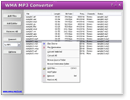
WMA to MP3 Converter converts WMA
to MP3 and vice versa. The software also converts WMV
to MP3 and ASF to MP3.
WMA to MP3 Converter is an easy-to-use and
ALL-IN-ONE audio converter that supports more than 100
audio and video formats as input, and convert file to MP3, WMA, WAV, OGG, AAC,
MP4, M4A, M4B, M4R, AIFF, ALAC, FLAC, CAF, and so on. The converter keeps
ID3 tag when converting. You can change encoding parameters of target
files such as sample frequency, bit rate, channels, and quality. It's also possible
to change volume of target file.
The converter supports batch conversion.
You can add a bulk of files and convert them at a time. It's also full compatible
with Windows 10/8/7/Vista/XP/2000.
Windows Media Audio (WMA) is an
audio data compression technology developed by Microsoft. The name can be used
to refer to its audio file format or its audio codecs. It is a proprietary technology
that forms part of the Windows Media framework. A WMA file is in most circumstances
contained in the Advanced Systems Format (ASF), a proprietary Microsoft
container format for digital audio or digital video. The ASF container format
specifies how metadata about the file is to be encoded, similar to the ID3 tags
used by MP3 files. Metadata may include song name, track number, artist name,
and also audio normalization values. This container can optionally support digital
rights management (DRM) using a combination of elliptic curve cryptography key
exchange, DES block cipher, a custom block cipher, RC4 stream cipher and the SHA-1
hashing function.
 Free Download WMA to MP3 Converter
WMA to MP3 Converter is 100% clean and safe to install.
It's certified by major download sites.

Top 11 Benefits of WMA to MP3 Converter:
- Convert WMA to MP3
Convert your WMA files to MP3 format for playing them in your MP3 or iPod player.
- Convert WMA to WAV
If you want to burn your WMA onto a CD and play in your CD player you should
convert them into WAV format first.
- Convert 100+ files to WMA and rip CD to
WMA
WMA sounds better MP3 under same bit rate. For instance, a WMA at 128kbps sounds
better than an MP3 at 128kbps. So, you can convert your files into WMA and get
higher audio quality by the WMA converter.
- Resample WMA
If you have lots of high bit rate WMA files that consume mass storage space,
you can resample them into a lower bit rate file and reduce file size so that
saving storage space.
- ID3 tag
The software supports to add, keep, or transfer ID3 tag such as title, artist,
album, year, comment, and genre when converting or resampling.
- Change sound volume
If the sound of your files is too low or high, you can use the software to
increase or decrease sound volume.
- Split left and right channels into two files
Many karaoke songs got the music on one channel and music + voice on
the other channel, and this would be a way to create files with only music on
both channels and also to create files with music + voice on both channels. You
can get rid of a channel of a stereo file by the program.
- Batch conversion
To save your time, WMA to MP3 Converter supports batch
conversion. You can add multiple files, and then click "Convert"
to convert all file in batch.
- Output destination files to another folder and keep the original directory
tree path
If you have bulk of files within different folders, and you want to convert
them and output to another folder and keep the original tree path, you can use
the feature we designed for you.
- No experience of WMA, WMV, ASF, MP3, and WAV necessary
WMA to MP3 Converter is very easy-to-use without
knowledge of WMA, WMV, ASF, MP3, and WAV formats.
- Free Trial
WMA to MP3 Converter offers free trial for evaluating the software. The software
is 100% clean and safe to install. If you're looking for a freeware, please
remember a lot of freeware is not professinal. And some freeware bundles with
adware or malware that might harm your system.
File Formats WMA to MP3 Converter Supported:
| Input File
Formats |
3G2, 3GP, 3GP2, 3GPP, 4XM, AAC, AC3, ADTS, ADX, AFC, AIF, AIFC,
AIFF, ALAW, AMR, AMV, APE, ASF, AU, AVI, AWB, CAF, CDA, CDATA, CIF, DIF, DIVX,
DNXHD, DRC, DTS, DV, DVD, DVR-MS, DXA, EAC3, FLAC, FLC, FLI, FLIC, FLV, FLX, GSM,
GXF, H261, H263, H263+, H264, IT, KAR, M1A, M1V, M2A, M2T, M2TS, M2V, M4A, M4B,
M4R, M4V, MID, MIDI, MJ2, MJPEG, MJPG, MKA, MKV, MLP, MLV, MMF, MO3, MOD, MOV,
MP+, MP1, MP2, MP3, MP4, MPA, MPC, MPE, MPEG, MPG, MPGA, MPP, MPV, MTM, MTS, MTV,
MVI, MXF, NSA, NSV, NUT, NUV, OGA, OGG, OGM, OGV, OGX, OMA, PSP, PSX, PVA, QCIF,
QCP, QT, RA, RAM, RCV, RGB, RM, RMI, RMVB, ROQ, RPL, S3M, SDP, SHN, SMK, SND,
SOL, SOX, SPX, STR, SWF, THD, TS, TTA, UMX, VC1, VFW, VID, VMD, VOB, VOC, VQF,
W64, WAV, WAVE64, WM, WMA, WMD, WMV, WV, XA, XM, XVID, XWMV, Y4M, YUV |
| Output File Formats |
3G2 (audio track), 3GP (audio track), AAC, AAC for iPod/iPhone/iPad/iTunes/DSi,
AC3, AIFF, AMR, ASF (audio track), AU, AVI (audio track), CAF, DTS, FLAC, FLV
(audio track), M4A (MPEG-4 audio), M4B (MPEG-4 audiobook), M4R (iPhone ringtone),
MKA, MMF, MOV (audio track), MP2, MP3, MP4 (audio track), MPA, OGG, SWF
(audio track), VOC, WAV, WMA, WMV (audio track) |
WMA to MP3 Converter Key Features:
- Easy-to-use and fast-to-convert
- Convert WMA to MP3
- Convert WMV to MP3
- Convert ASF to MP3
- Convert WMA to WAV
- Convert MP3 to WMA
- Join WMA Files
- Support more than 100 audio and video formats as input
- Convert file to 30 formats such as AAC, AIFF, ALAC, AMR, CAF, FLAC, M4A, M4B,
MP3, MP4, MPA, OGG, WAV, and WMA
- Normalize volume WMA/WMV/ASF and MP3 file automatically
- Convert a part of WMA/WMV/ASF and MP3
- Resample WMA
- Keep ID3 tag
- Change volume
- Support batch conversion
- Support drag and drop
Free Download WMA to MP3 Converter
WMA to MP3 Converter Quick Info:
- Version: 4.3 build 1489
- Size: 3.99 MB
- License: Free to try
- Platforms: Windows 10 / 8 / 7 / Vista / 2008 / XP / 2003 / 2000 (both 32-bit
and 64-bit editions compatible)
WMA to MP3 Converter Tutorials:
WMA to MP3 Converter Version History:
- WMA to MP3 Converter
has been replaced by Total Audio MP3 Converter
- WMA to MP3 Converter v4.3 build 1489
- Supports Unicode file name
- Supports non-English ID3 tag
- Supports new output formats CAF and DTS
- Fixes bugs
- WMA to MP3 Converter v4.2 build 1428
- Converts a part of a file like WMATrim
- Automatically normalizes volume of WMA/WMV/ASF and MP3 files so that all output
files have the same volume just like WMAGain
- Improves user interface
- Fixes bugs
- WMA to MP3 Converter v4.1 build 1296
- Converts multiple WMA files to one WMA
- Fixes bugs
- WMA to MP3 Converter v4.0 build 1217
- Adds more output formats
- Adds more codecs
- Fixes bugs
- WMA to MP3 Converter v3.6 build 1129
- Adds target formats: WMV, ASF, and M4R
- Supports more input file formats
- Fixes bugs
- WMA to MP3 Converter v3.5 build 1019
- Improves conversion kernel
- Supports more input file formats
- Improves sound quality of MP3, WMA, OGG files
- Fixes bugs
- WMA to MP3 Converter v3.4 build 998
- Improves ID3 tag, supports both ID3v1 and ID3v2 tag
- Supports tags: composer and copyright
- Supports to customize tag genre
- Fixes bugs
- WMA to MP3 Converter v3.2 build 988
- Supports more than 60 files as input
- Fixes bugs
- WMA to MP3 Converter v2.7 build 948
- Supports M4A, M4B, MP4, M4V, AAC, CDA, FLAC, WV, AC3, AIFF, AIF, AIFC, AFC,
APE, MAC, MPC, MP+, MPP, ADX, SPX, and TTA files
- Converts files to AAC, MP4, M4A, and M4B
- Fixes bugs
- WMA to MP3 Converter v2.3 build 889
- Adds option "Output files to My Documents if creating file failure"
- Supports OGG, OGA, AU, SND files
- Supports MOD music (XM, IT, S3M, MOD, MTM, and UMX files)
- Supports MO3 music (MP3/OGG compressed MODs)
- Adds option "If output channel is set to mono and the original file is stereo,
output sound equals to: (L+R)/2, L channel, or R channel"
- Adds option file extension name filter for 'Add Folder' and drag/drop
- Adds option "Same as original file" for sample frequency, bit rate, channels
for MP3 file
- Adds option "Same as original file" for sample frequency, bits, channels for
WAV file
- Fixes bugs
- WMA to MP3 Converter v2.1 build 817
- Adds option "rename, overwrite, or skip when target file exists"
- Fixes bugs
- WMA to MP3 Converter v2.1 build 791
- Supports to convert WAV to WMA
- Supports to convert MP3 to WMA
- Supports to convert WMV to WMA
- Supports to convert ASF to WMA
- Supports to resample WMA
- Fixes bugs
|